
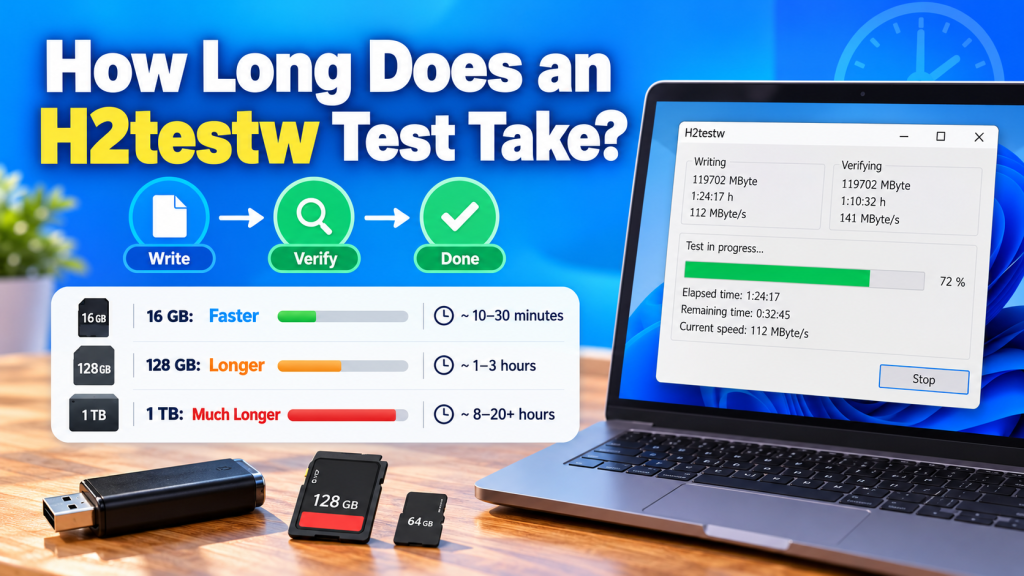
H2testw test duration depends mainly on the storage capacity and the read/write speed of the device being checked. A small USB drive may finish relatively quickly, while a large SD card, microSD card, SSD, or high-capacity flash drive can take several hours to complete a full write-and-verify test.
The process takes time because H2testw does more than simply scan the drive. It first writes test data across the selected storage space and then reads that data back for verification. The larger and slower the device is, the longer the complete test will usually take.
What Determines H2testw Test Time?
The biggest factor is the amount of storage being tested. Testing 16 GB will usually take far less time than checking 128 GB, 512 GB, or 1 TB of storage.
The speed of the storage device also matters. A USB 3.x flash drive with fast sustained write speeds may complete much sooner than an older USB 2.0 drive or a low-cost memory card with slow write performance.
Why Does H2testw Take So Long?
H2testw uses a full write-and-read method rather than performing a quick surface scan. During the first stage, it fills the selected free space with test files.
After that, it starts the verification stage and reads those files back. This two-stage process gives more reliable capacity information, but it naturally takes longer than simply checking the size shown by Windows.
Estimated H2testw Testing Times
Actual times vary between devices, but general estimates can help users understand what to expect. Faster storage can complete much sooner, while slow or fake storage may take considerably longer.
| Storage Size | Possible Test Time |
|---|---|
| 16 GB | Around 10–30 minutes |
| 32 GB | Around 20–60 minutes |
| 64 GB | Around 30–90 minutes |
| 128 GB | Around 1–3 hours |
| 256 GB | Around 2–5 hours |
| 512 GB | Several hours |
| 1 TB or more | Several hours to a full day |
These are only rough estimates. The actual result depends on the device, USB interface, card reader, computer, and sustained transfer speed.
Does Write Speed Affect the Test?
Yes. Write speed has a major impact because H2testw must fill the selected storage before verification can begin. A device writing at 100 MB/s will usually finish much faster than one writing at 10 MB/s.
Cheap or counterfeit flash drives can sometimes have extremely slow sustained write speeds. In those cases, even a medium-sized device may require many hours before the writing stage is complete.
Verification Speed Also Matters
The verification stage can be faster than writing because many storage devices read data more quickly than they write it. However, this is not guaranteed for every device.
H2testw must still read all the test data back, so verification can add a significant amount of time to the total process. A full test is complete only after both writing and verification finish.
Can You Estimate the Remaining Time?
H2testw normally displays progress information while the test is running. Depending on the stage, users may see the amount of data processed, transfer speed, and an estimated remaining time.
The estimate may change during the test because storage speed is not always constant. Some flash drives begin quickly and then slow down after their internal cache is filled.
Is a Full Test Always Necessary?
A full test is recommended when you want to confirm the complete advertised storage capacity. Testing only a small portion may miss fake capacity or damaged memory located farther into the drive.
A partial test can still be useful when you only want a quick initial check. However, it should not be treated as proof that the entire storage device is genuine or error-free.
Can You Make H2testw Faster?
You cannot make H2testw ignore the amount of data required for a complete test, but you can avoid unnecessary slowdowns. Using a fast USB port and a reliable card reader may improve performance.
For best results, avoid connecting a high-speed device through an old USB hub or slow adapter. Closing other applications that are heavily using the same storage or system resources may also help maintain more consistent transfer speeds.
Does USB 2.0 Take Longer Than USB 3.x?
In most cases, yes. USB 2.0 has much lower practical transfer speeds than newer USB standards, so large-capacity drives can take significantly longer to test.
If the storage device supports a newer USB standard, connect it to a compatible high-speed port. However, the storage device itself must also be fast enough to benefit from the faster connection.
Why Can Fake Drives Take Extra Time?
Fake USB drives are often made with low-quality or very slow flash memory. Even before errors appear, their write speeds may be much lower than expected for the advertised product.
Some fake-capacity devices also behave unpredictably once their real memory limit is reached. H2testw may continue testing the claimed space, making the process slow before the final report reveals corrupted or unusable data.
Should You Stop a Long H2testw Test?
If the test is progressing normally, it is usually better to let it finish. Stopping early means the remaining storage has not been tested, so you will not have a complete picture of the drive’s capacity.
However, if the device disconnects repeatedly, produces serious errors, or appears completely unresponsive, you may need to investigate the connection or hardware before trying again.
Can You Use the Computer During the Test?
You can usually continue using the computer while H2testw is running, but avoid disconnecting or heavily using the storage device being tested.
Copying other large files to the same drive may affect performance and make the test slower. For the cleanest results, allow H2testw to use the storage device without unnecessary interference.
Conclusion:
H2testw test time can range from a few minutes to many hours depending on storage capacity, write speed, read speed, and connection type. Smaller and faster drives finish sooner, while large or slow storage devices may require several hours for complete verification.
H2testw takes longer because it performs a real write-and-read test instead of simply checking reported capacity. If your goal is to confirm whether a USB drive or memory card is genuine and reliable, allowing the full test to finish provides the most useful result.