
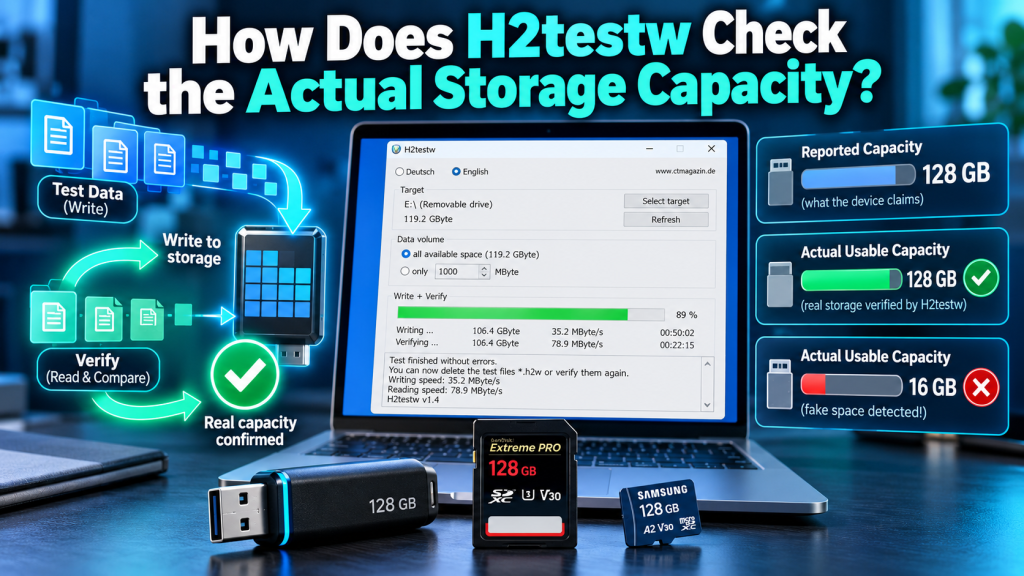
H2testw checks the actual storage capacity of a drive by writing test files across its available space and then reading those files back for verification. Instead of trusting the capacity displayed by Windows, it performs a practical test to see whether the device can really store and return the amount of data it claims.
This method is especially useful for USB flash drives, SD cards, and microSD cards that may have fake or damaged storage. A device can report a large capacity to the operating system even when the physical memory is much smaller, but H2testw can reveal that problem through real write-and-read testing.
Why Reported Storage Capacity Can Be Misleading
Windows normally shows the storage size reported by the device controller. That number does not always prove that the full capacity physically exists or that every part of the drive can safely store data.
Some counterfeit storage devices are programmed to display a much larger capacity than they actually contain. This is why checking only the drive properties is not enough when you want to confirm the real usable storage.
H2testw Tests the Storage With Real Data
H2testw does not rely only on the size shown by Windows. It creates real test files and writes them into the selected free space of the storage device.
This practical method is important because fake-capacity drives may appear normal until enough data is copied to them. By filling the storage, H2testw can reach areas where hidden capacity problems begin to appear.
What Happens During the Writing Stage?
When the user selects Write + Verify, H2testw starts creating test files on the chosen drive. These files are written across the amount of free space selected for testing.
The purpose of this stage is to see whether the drive can accept data throughout its claimed storage area. If the device has less real memory than advertised, problems may begin once the genuine physical capacity has been exceeded.
Why the Verification Stage Matters
Writing files alone does not prove that the storage is reliable. A fake or damaged drive may appear to accept files even though the data is not actually being stored correctly.
During verification, H2testw reads the test files back and compares the returned data with what was originally written. If the information is missing, changed, or corrupted, the program reports an error.
How H2testw Detects Fake Capacity
A fake storage device may continue reporting free space even after its real physical memory is already full. New data may overwrite older information, disappear, or become unreadable.
H2testw exposes this behavior by checking whether every written block of data can be read back correctly. If errors begin after a certain point, that may indicate that the usable storage is much smaller than the advertised capacity.
Example of Advertised vs Actual Storage
Imagine a USB drive advertised as 128 GB but containing only 16 GB of real flash memory. Windows may still show close to 128 GB because the controller has been programmed to report that size.
H2testw may successfully write and verify the first 16 GB, while data written beyond that point starts failing. The result would show that only part of the claimed capacity is genuinely usable.
| Capacity Check | What It Shows |
|---|---|
| Windows drive size | Capacity reported by the controller |
| H2testw writing stage | Whether data can be written |
| H2testw verification stage | Whether written data can be read back |
| Final test result | Possible fake, damaged, or unusable storage |
Why Testing All Available Space Is Better
Testing all available space provides a more complete capacity check. A small test may finish without errors even when problems exist deeper inside the storage device.
For example, testing only 4 GB of a fake 128 GB drive may not reveal anything if the real memory is 16 GB. A full test is much more likely to reach the point where false capacity or damaged memory starts causing errors.
Can H2testw Show the Real Usable Capacity?
H2testw can help users estimate how much storage successfully passes the write-and-verify process. Its results can show how much data was stored correctly and how much became corrupted or unreadable.
However, the result should be treated as tested usable capacity rather than a direct hardware measurement of every memory chip. Faulty ports, readers, adapters, or damaged file systems can also affect the result.
What Does a Successful Test Mean?
If H2testw completes the full test without errors, it means the selected storage space successfully accepted and returned the test data during that test.
This is a strong sign that the tested capacity is functioning correctly. However, no test can guarantee that a storage device will never fail later because flash memory can wear out or develop faults over time.
What Can Cause H2testw Errors?
Not every H2testw error means the drive is fake. Problems can also be caused by a poor USB connection, damaged card reader, unstable adapter, failing memory, or file-system issues.
If errors appear, users can try another USB port or card reader and repeat the test. If the same errors return at similar storage points, the drive itself is more likely to be defective or falsely reporting its capacity.
Why H2testw Is Better Than Checking Drive Properties
Checking drive properties only tells you what the storage device claims its capacity is. It does not prove that every gigabyte can safely store and return data.
H2testw performs a real write-and-read test, which makes it more useful for suspiciously cheap USB drives, large-capacity memory cards, or any storage device where fake capacity is a concern.
Conclusion:
H2testw checks actual storage capacity by writing test files across the available space and then reading them back for verification. This process helps determine whether the advertised capacity can genuinely store data instead of simply trusting the number shown by Windows.
H2testw is especially useful for detecting fake-capacity USB drives and memory cards because false storage often fails once the real memory limit is exceeded. A complete write-and-verify test provides a practical way to identify usable capacity, corruption, and unreliable storage.