
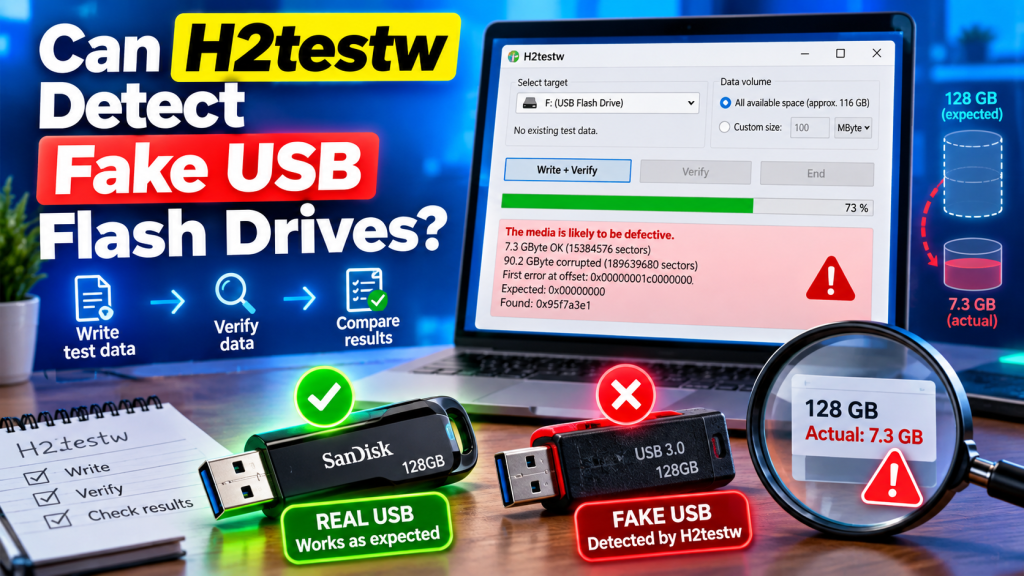
H2testw can detect many fake USB flash drives by checking whether the device can actually store the amount of data it claims. Counterfeit drives may appear in Windows with a large capacity even when the physical flash memory inside is much smaller. A proper H2testw test can expose this difference.
The software works by writing test files to the selected storage space and reading them back afterward. If the USB drive cannot correctly store data across its advertised capacity, H2testw reports verification errors. This makes it useful for identifying fake-capacity drives before important files are lost or corrupted.
How Fake USB Drives Show False Capacity
A counterfeit USB drive may contain much less memory than the capacity shown by Windows. The controller firmware can be manipulated so the operating system believes the device has far more storage than is physically available.
For example, a drive advertised as having hundreds of gigabytes may contain only a small fraction of that amount. Files can appear to copy normally at first, but problems begin once the genuine memory limit is exceeded.
How H2testw Exposes Fake Storage
H2testw tests the drive using real data rather than trusting the capacity information reported by the USB controller. It writes test files into the available space and then checks whether those files can be read back without changes.
If the drive has fake capacity, data written beyond the real memory limit may disappear, become corrupted, or overwrite earlier information. H2testw detects these verification failures and can reveal that the usable capacity is smaller than advertised.
What a Fake USB Drive Test Looks Like
A complete H2testw test usually includes both a writing stage and a verification stage. During writing, the program fills the selected free storage with test files. During verification, it reads those files and compares the returned data with the original information.
A suspicious drive may begin showing errors after a certain amount of storage has been used. Heise documented counterfeit devices where errors started after roughly 4 GB, 8 GB, 16 GB, or 32 GB, despite the drives claiming much larger capacities.
Signs H2testw May Find on a Fake Drive
H2testw can reveal several warning signs when testing suspicious flash storage. These results may help distinguish a reliable device from one that does not provide its advertised capacity.
Common warning signs include:
- Data that cannot be verified correctly
- Corrupted test files
- Storage errors after a specific capacity is reached
- Much less usable space than advertised
- Extremely slow writing or verification
- Repeated failures during full-capacity testing
One error alone does not always prove that a drive is counterfeit because hardware faults, unstable connections, or damaged memory can also cause problems. Repeated capacity-related failures, however, should be treated seriously.
Can Windows Detect the Same Problem?
Windows File Explorer normally displays the capacity reported by the device controller. It does not automatically confirm that every advertised gigabyte can physically store and return data correctly.
This is why a fake USB drive can initially look completely normal. H2testw provides a deeper check because it attempts to use the storage space rather than simply reading the capacity value supplied by the device.
Should You Test the Entire USB Drive?
For the strongest capacity verification, testing all available space is usually preferable. A small test may only examine the genuine portion of a counterfeit drive and could therefore miss the point where storage corruption begins.
Full testing can take a long time, especially on very large or unusually slow drives. Heise has documented fake high-capacity devices that required extremely long tests because their write speeds were very low.
Can a Shorter Test Still Find a Fake?
Sometimes. If you suspect that a supposedly large drive actually contains only a small amount of memory, you can test an amount slightly above common fake capacities. This may reveal errors much sooner than a complete multi-terabyte test.
Heise notes that testing around 40 GB can sometimes quickly expose cheap drives whose real capacity is only around 32 GB. However, a limited test cannot fully confirm the entire advertised capacity, so complete verification remains more thorough.
What Should You Do Before Testing?
Back up any valuable files before running a serious capacity test. A fake or defective USB drive is already unreliable, and writing large amounts of test data could expose existing problems that put stored files at risk.
For the clearest results, testing an empty or freshly prepared drive is usually better. It also allows H2testw to access more of the free space, making the test more representative of the device’s claimed capacity.
What If H2testw Reports Errors?
If H2testw reports errors, avoid using the USB drive for backups, important documents, photos, or other valuable data until the cause is understood. Try another USB port and repeat the test if you suspect a connection issue.
If the same storage errors consistently appear at similar capacity points, the device may be defective or falsely reporting its size. Returning or replacing a newly purchased drive is generally safer than trusting questionable storage.
Can H2testw Confirm a Genuine Drive?
A successful full-capacity test provides strong evidence that the tested storage area can correctly write and return data. Heise has used H2testw to verify genuine high-capacity USB drives as well as expose fake storage products.
However, a successful test does not guarantee that a USB drive will never fail in the future. Flash memory can wear out or develop faults later, so important files should still be backed up in more than one location.
Conclusion:
H2testw can detect fake USB flash drives by testing whether their advertised storage capacity actually works. Instead of trusting the size shown by Windows, it writes data across the drive and verifies that the same information can be read back correctly.
H2testw is especially useful for suspiciously cheap or unusually high-capacity USB drives. A full write-and-verify test can reveal fake capacity, corruption, and unreliable storage before you depend on the device for valuable files.